


AI alt text generator for Craft CMS
Auto-generate alt text for every Craft CMS image — accurate, compliant, and built for your assets library.

THE PROBLEM
What every untagged image costs your Craft CMS site
Accessibility: For visitors using screen readers, an untagged image is silence. No description, no context, no way to understand what's on the page. Every meaningful image on your site needs alt text to meet WCAG 2.1 AA — the legal standard under the ADA in the US and the EU Accessibility Act.
Scale: Craft CMS gives you full control over your content structure. Alt text fields are one thing it doesn't manage for you automatically. For sites with hundreds of entries across multiple volumes, writing descriptions one asset at a time is a task that outlasts every project sprint.
How to add alt text to Craft CMS images automatically
Install from the Craft Plugin Store
Get the AltTextLab plugin directly from the Plugin Store or install it via Composer. Enter your API key in the plugin settings. No custom code, no additional configuration — the plugin connects directly to your Craft installation.


Bulk-process your entire media library
For images already in your Craft installation, run bulk generation across your assets volumes. Select the volumes and image types you want to process, click generate, and the plugin works through them in your browser.
Every new asset upload gets alt text automatically
Turn on automatic generation in the plugin settings and every image uploaded to Craft's assets gets alt text written to it on the spot. Or if you prefer, you can trigger it manually when you need to. Alt text is written directly to the standard Craft alt text field, the same one your templates and SEO plugins read.

Running a Craft Commerce store?
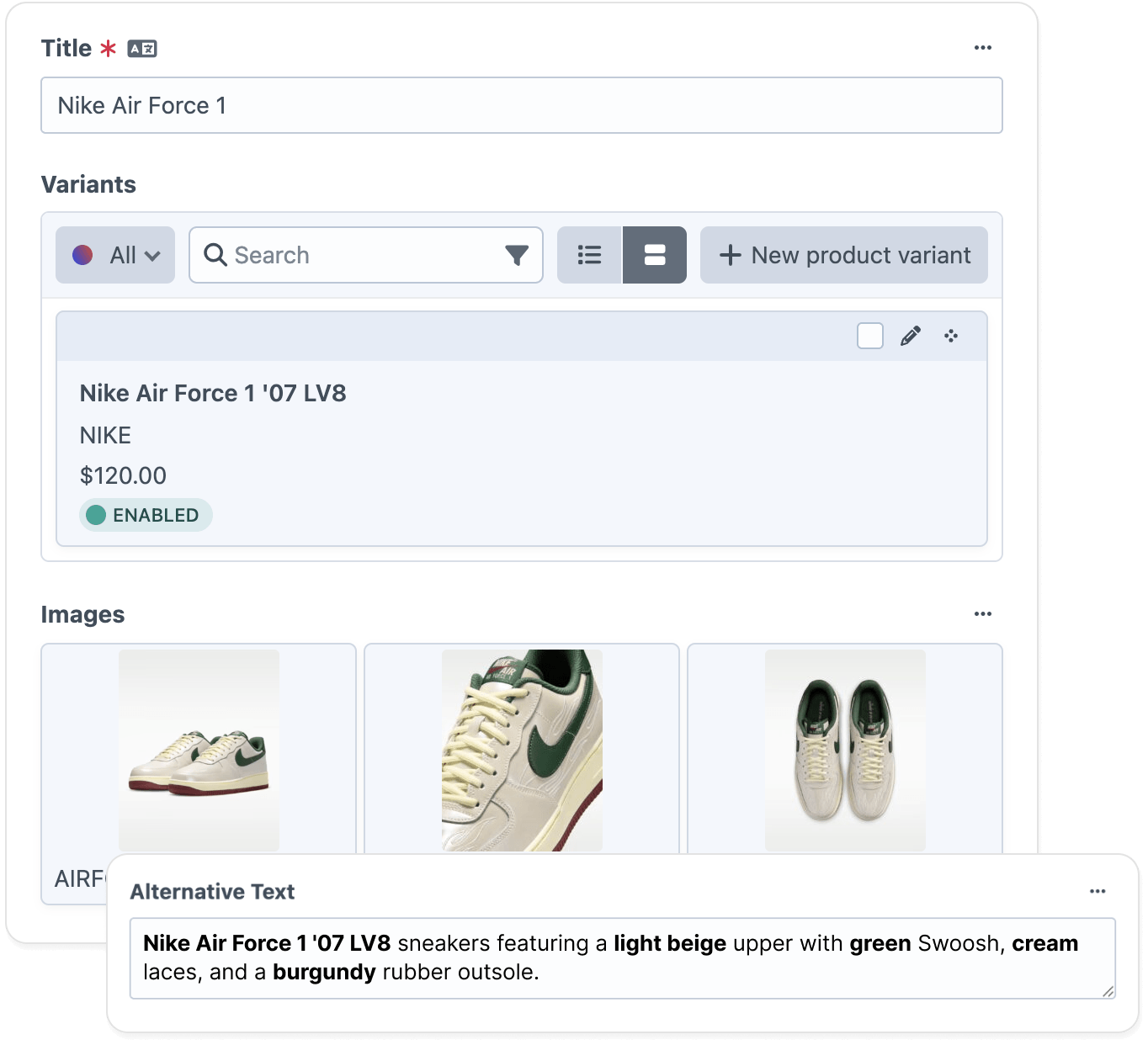
Built for Craft CMS sites, not generic image tagging

Craft-native integration

Custom writing styles

Multi-site support

WCAG 2.1 AA compliant output

130+ languages supported

Privacy-first and GDPR-aligned
Teams that stopped writing alt text by hand








Will AltTextLab overwrite alt text my content authors have already written?

No. The plugin only processes assets where the alt text field is empty. Any asset where a content author has already entered a description is left exactly as it is. If you want to regenerate alt text across assets that already have descriptions, that's available as an explicit opt-in setting, not something that happens automatically.
Does AltTextLab work with private assets or volumes without public URLs?
This depends on how your private assets are served. For assets in volumes with public URLs, the plugin fetches the image directly by URL for analysis. For private assets with no public URL, the plugin uses direct upload mode, sending the image file to AltTextLab for processing rather than fetching it via URL. You can configure which mode the plugin uses in the settings — both produce the same quality output.
Does AltTextLab work with Craft Commerce product images?
Yes. When an image is linked to a Commerce product or variant, the plugin reads product metadata — name, brand, color, and material — and passes it to the API alongside the image. This produces product-specific alt text rather than a generic visual description. Note: product context is only available during bulk generation, not on initial upload, since Craft hasn't linked the asset to a product at upload time.
Does AltTextLab work with Craft 4 and Craft 5?
AltTextLab's plugin supports 5 and later only. If your project is still running on Craft 4, you'll need to upgrade to Craft 5 before installing the plugin.
Does image alt text improve Craft CMS SEO and visibility in LLMs?
Yes. Alt text is the primary signal Google uses to understand and index images in Google Image Search, which drives meaningful traffic to content-heavy, product-focused Craft sites. It also makes your images readable to LLMs like ChatGPT and Perplexity, which use alternative text to surface content in AI-generated answers. Without it, your images are invisible to both, regardless of how well the surrounding content ranks.
What happens to alt text if I uninstall the plugin?
Alt text stays. AltTextLab writes alt text directly to Craft's database in the native alt text field identically to text you would have entered manually in the control panel. Uninstalling the plugin does not remove any generated alt text. Everything written by AltTextLab is permanent.
Auto-generate alt text inside Craft CMS


